


- Home
- A-Z Catalogue
- Products
- Valves
- Cetop
- Manual Directional Valves
- Proportional Valves
- Poppet Valves
- High-Speed Linear Servo Valves
- All High-Speed Linear Servo Valves
- Cetop 10 (NG32) Two Stage Type High Speed Linear Servo Valves – LSVHG-10
- Cetop 10 (NG32) Two Stage Type High Speed Linear Servo Valves – LSVHG-10 (With Fail-Safe)
- Cetop 8 (NG25) Two Stage Type High Speed Linear Servo Valves – LSVHG-06
- Cetop 8 (NG25) Two Stage Type High Speed Linear Servo Valves – LSVHG-06 (With Fail-Safe)
- Cetop 7 (NG16) Two Stage Type High Speed Linear Servo Valves – LSVHG-04
- Cetop 7 (NG16) Two Stage Type High Speed Linear Servo Valves – LSVHG-04 (With Fail-Safe)
- Cetop 5 (NG10) Direct Type High Speed Linear Servo Valves – LSVG-03
- Cetop 5 (NG10) OBE Type Direct Operated Linear Servo Valves – LSVG-03-EH
- Cetop 3 (NG6) OBE Type Direct Operated Linear Servo Valves – LSVG-01-EH
- Pumps
- Pressure control
- Flow Control Valves
- Pressure Control Valves
- All Pressure Control Valves
- Brake Valves
- Direct Relief Valve
- Low Noise Solenoid Controlled Relief Valves
- Low Noise Pilot Operated Relief Valves
- Pilot Operated Relief Valves
- Pressure reducing and relieving valves
- Pressure reducing and check valves
- Pressure control valves
- Remote Control Relief Valves
- Solenoid Controlled Relief Valves – BSG
- Solenoid Controlled Relief Valves – BST
- Unloading relief valves
- Check valves
- Environmental
- Valves
- Hydraulic Systems
- Power pack
- About Us
- Contact
- Blog

Why Choose a WiFi Humidity Sensor for Smart Monitoring?
A WiFi Humidity Sensor turns invisible moisture into practical, timely information. It can monitor a nursery, archive room, greenhouse, server cabinet, or storage area without constant manual checks. When humidity rises near a cardboard box or cool metal surface, the sensor can send an alert before mold, corrosion, or product damage becomes obvious.
Kevin Ashton, a technology strategist widely credited with coining the term “Internet of Things,” said, “The Internet of Things has the potential to change the world, just as the Internet did. Maybe even more so.” His observation explains why connected environmental monitoring matters. A WiFi Humidity Sensor does more than display a percentage. It creates a record, supports quicker decisions, and helps people notice gradual changes that ordinary inspections may miss.
The benefits are practical. Users can view readings remotely, compare daily patterns, and receive notifications when humidity exceeds a chosen range. Installation is often simple. However, convenience should not replace judgment. Wi-Fi can fail. Batteries can weaken. Poor sensor placement can produce misleading readings near vents, windows, or damp surfaces. Calibration also deserves attention, especially in sensitive storage environments.
A reliable system combines accurate hardware, stable connectivity, clear data, and regular maintenance. It should be checked against a trusted reference when conditions matter. That extra step is easy to overlook. Still, it can separate useful monitoring from false confidence. Choosing a WiFi Humidity Sensor means choosing earlier visibility, not perfect certainty.
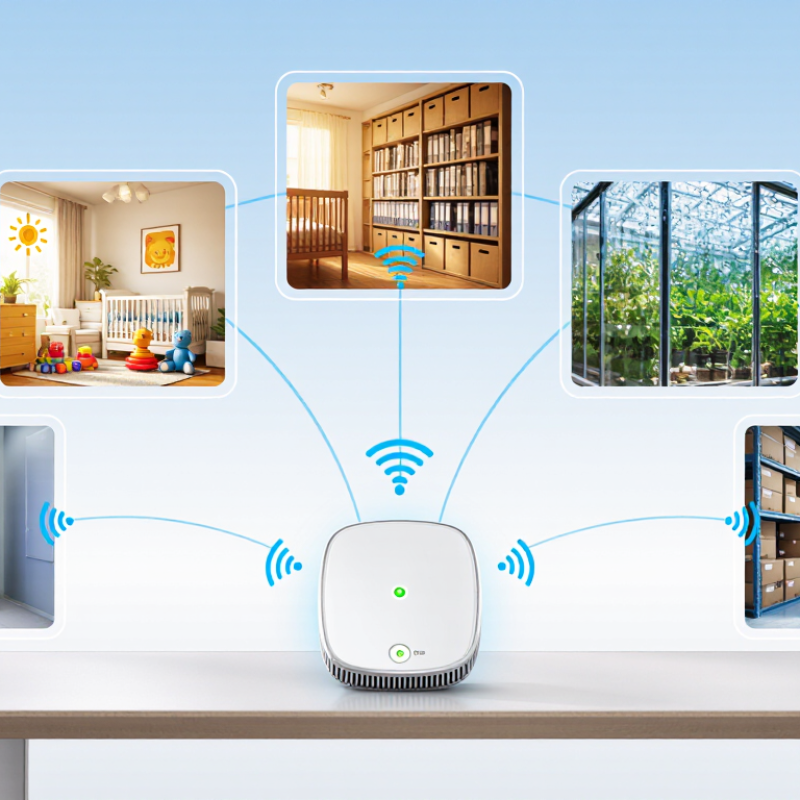
Table of Contents [Hide]
What Is a WiFi Humidity Sensor? ASHRAE Recommends 30–60% Relative Humidity
Why Choose a WiFi Humidity Sensor for Smart Monitoring?
A WiFi humidity sensor measures relative humidity and sends readings through a wireless network. This allows remote monitoring from a phone or computer. ASHRAE recommends maintaining indoor relative humidity between 30% and 60%. This range supports comfort and helps reduce conditions linked to mold growth and excessive dryness. A sensor can reveal changes before people notice them. For example, a storage room may reach 68% RH overnight, while daytime readings seem normal. Continuous data exposes that hidden pattern.
Tips: Place the sensor away from windows, vents, heaters, and direct sunlight. These locations can distort readings. Check its accuracy against a trusted reference when possible. Set alerts near 30% and 60%, but avoid treating these limits as absolute. Building materials, climate, and room use also matter.
WiFi monitoring is useful for basements, archives, bedrooms, and equipment rooms. Historical graphs help identify leaks, poor ventilation, or seasonal shifts. However, no sensor is perfect. Network failures, weak batteries, and poor placement can create misleading gaps. A precise-looking number may still need inspection. Use the data with regular visual checks, especially around corners, pipes, and cold surfaces. The best decision comes from both measurements and context.
Why Choose a WiFi Humidity Sensor for Smart Monitoring? - What Is a WiFi Humidity Sensor? ASHRAE Recommends 30–60% Relative Humidity
| Monitoring Dimension | Relative Humidity Range or Requirement | What It Indicates | Recommended WiFi Monitoring Action |
|---|---|---|---|
| Preferred indoor range | 30%–60% RH | A commonly recommended range for occupied indoor environments. ASHRAE guidance identifies 30%–60% RH as a suitable range for many indoor applications. | Create a normal operating zone and display the current reading on a dashboard. |
| Low humidity | Below 30% RH | Dry air may increase discomfort, static electricity, and moisture loss from some materials. | Send a low-humidity alert and check ventilation, heating, or humidification settings. |
| Elevated humidity | Above 60% RH | Moisture-related risks become more likely, particularly in poorly ventilated or cool areas. | Trigger a warning after a sustained exceedance and inspect ventilation or dehumidification. |
| High humidity | Above 70% RH | Persistent high humidity can support mold growth on suitable damp surfaces and may damage moisture-sensitive contents. | Send a high-priority alert, record the duration, and investigate leaks, condensation, or inadequate air exchange. |
| Temperature compensation | Record temperature together with RH | Relative humidity changes with temperature, so an RH value is more useful when its corresponding temperature is known. | Use a combined temperature-and-humidity sensor and display both readings in the same record. |
| Condensation risk | Surface temperature at or below the dew point | Water can condense when a surface becomes colder than the surrounding air’s dew point, even if room RH is within the preferred range. | Use temperature and RH data to calculate dew point and monitor cold walls, pipes, windows, or equipment. |
| Measurement accuracy | A practical general-purpose target: approximately ±3% RH | Higher accuracy improves confidence near alert thresholds. Actual performance depends on the sensor, temperature, and calibration. | Select a sensor with documented accuracy across the intended temperature and RH range. |
| Sampling and reporting | Configurable intervals, such as 1–15 minutes | Shorter intervals capture rapid changes, while longer intervals can reduce network traffic and battery use. | Choose the interval according to the environment, asset sensitivity, and required response time. |
| Alert logic | Use threshold plus persistence time | A brief humidity spike may be normal, while a sustained deviation is more likely to require action. | Add a delay, such as 5–15 minutes, before sending an alert to reduce nuisance notifications. |
| Remote visibility | Live readings, historical trends, and notifications | A WiFi humidity sensor transmits measurements to a connected platform, enabling monitoring without being physically present. | Use dashboards, trend charts, and email or mobile notifications for faster response and record keeping. |
| Calibration and placement | Follow the device instructions and avoid direct heat, sunlight, vents, and water spray | Incorrect placement or sensor drift can produce misleading readings. | Check readings periodically, compare with a trusted reference when needed, and place the sensor where representative air conditions can be measured. |
Note: Alert thresholds should be adjusted for the building, climate, contents, and applicable operating requirements. The 30%–60% range is general indoor guidance and is not a substitute for application-specific standards or professional assessment.